A free image processor that can rival Photoshop
Image processing is a very important step for photography. However, with all the expensive equipment necessary for traditional photography, it’s no wonder most people who are just trying out photography prefer editing their images with their readily available computers. Still, image processing software themselves can be pretty pricey. If you’ve been looking for a quality image processor that won’t leave you bankrupt, InPixio is the software for you. It has all of the necessary image processing functions that most photographers will need.
Top Recommended Alternative

Creative but Efficient
InPixio’s interface is a perfect mix of creativity and efficiency. Upon installing, users will be taken to an intro screen where they can choose to open files by browsing or through their recent files. The actual canvas interface is very reminiscent of Photoshop’s own interface, albeit a bit simpler in design. InPixio keeps all of its most important functions in a tab at the right of the screen. Once clicked, the different editing categories are shown with gorgeous image icons that showcase the capabilities of the program.
Presets vs Customization
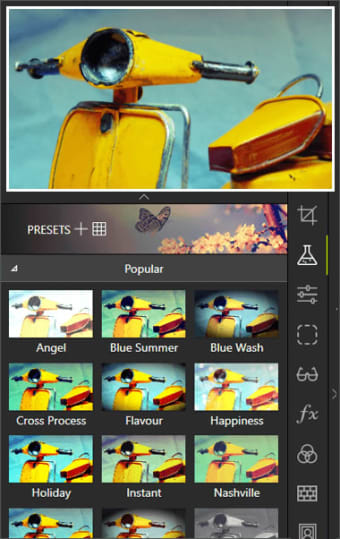
InPixio is definitely an image processing software meant for photographers. It is designed to help photographers and lessen their workload. The available presets are one of those features that photographers will really appreciate. There are dozens of available presets and more when users purchase the premium version. With one click, your raw images will be transformed into professional-looking images. Post them on Instagram and get those sweet Instagram likes.
Of course, not all photographers like presets. Some of them prefer to play with the images on their own so that they have more control over their finished products. With that in mind, InPixio also has a lot of customization options. They are not limited to the basic image editing options like brightness and contrast. InPixio offers so much more.
Edit to Your Heart’s Content
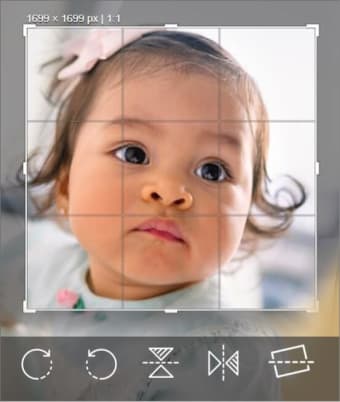
As mentioned above, InPixio has all of the editing functions at the right-hand side of the window. They are divided into nine categories. The first is the aforementioned presets. The second category is for cropping. This contains cropping options and users can choose popular dimensions or use their own. The third category is for image adjustments where users can adjust the colors and lighting of their images.
The fourth and fifth categories are for premium users. The fourth category is for adding gradients to the images while the fifth category allows users to edit the sharpness and noise in their images. The sixth category allows users to edit the color balance and add a vignette effect. The last three categories are mostly for the final touches. You can add a frame, texture, and text with the seventh, eighth, and ninth categories, respectively. With all of these editing options, you can rest assured that you’ll have all of the editing flexibility available. Of course, don’t expect any complicated functions like warping and liquifying.
Photo-editing on a budget
If you’re a photographer on a shoestring budget then InPixio is a great choice for image editing software. It may not have as many functions and abilities as Photoshop, but it definitely gets the job done. It will save you hundreds of dollars while also providing you with excellent quality images.